
7月25日までにGoogleフォームより、胃がん検診を申込まれましたか?
いいえ→健康診断Web予約へ / はい→胃がん検診申込み済の方の健診日時予約ページへ
Did you apply for the gastric cancer screening through Google Form by July 25?
予約サイトでは、毎年 初回ユーザー登録 にて、パスワードの設定を行う必要があります。
ログイン(初回ユーザー登録)に用いるIDは、SPS-ID/KING-IDではなく、職員証に記載されている「8桁の職員番号」となりますので、ご注意ください。(職員番号はこちら)
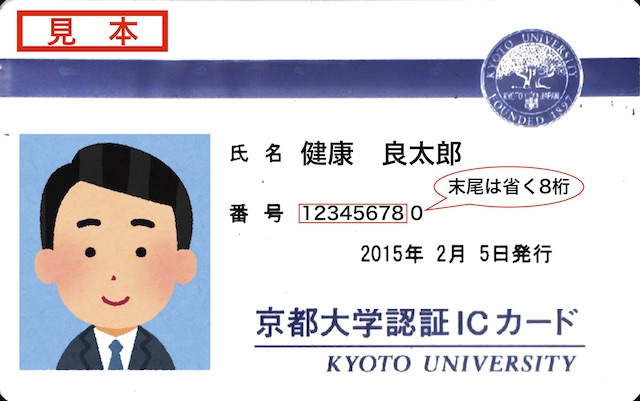
下の「健康診断Web予約」ボタンをクリックし、予約サイトで初回ユーザー登録の上、
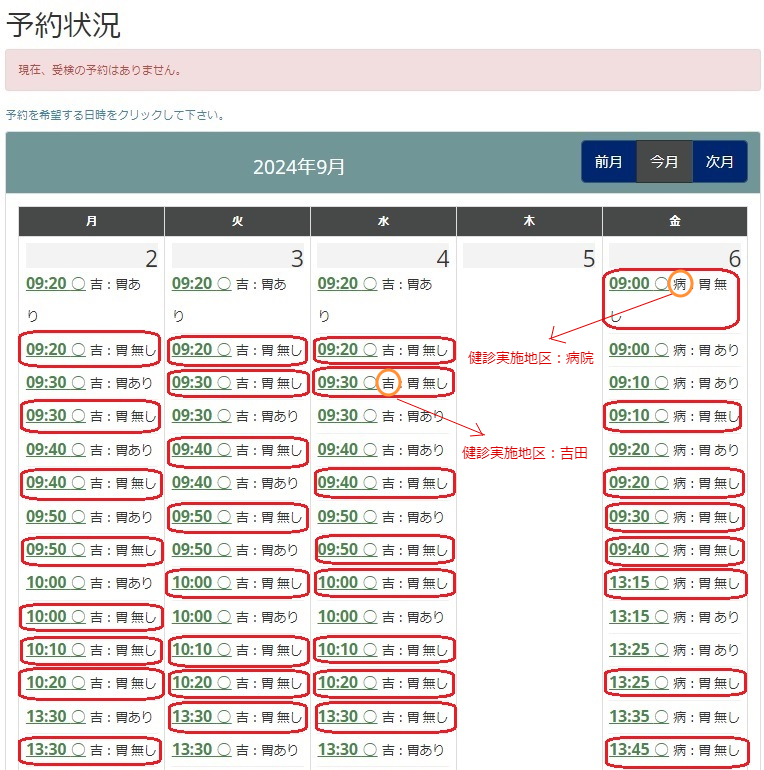
「吉:胃 無し」「病:胃 無し」「宇:胃 無し」「桂:胃 無し」
となっている時間枠(例:下画像赤○のところ)をご予約ください。
初めの一文字は実施場所です。
吉:本部地区、病:病院地区、宇:宇治地区、桂:桂地区
Password must be set at the first user registration each year.
Please note that the ID used for login is not the SPS-ID/KING-ID, but the “8-digit staff number” on your staff ID card. (Click here for the staff number)
Click “WEB Appointment for Employee Health Check-up” below and register as a first-time user at the site
and make a reservation by clicking on the time slot noted “吉:胃 無し”, ”病:胃 無し”, ”宇:胃 無し”, or ”桂:胃 無し”
(e.g., the red circle in the image below).
The first letter is the location.
吉: Yoshida, 病: Hospital, 宇: Uji, 桂: Katsura
予約サイト画面サンプル
Example of reservation site screen shot
スマートフォンから、予約システムにアクセスされると、一部の予約枠しか見えません。
PC版の表示にしていただければ、全ての予約枠をご確認いただけます。
【ご参考】
iPhoneの場合
①WEBサイトを開き、左下の「あぁ」の表示をタップします。
②「デスクトップ用Webサイトを表示」をタップします。
Androidの場合
①WEBサイトを開き、右上の「 ・ ・・」をタップします。
②「PC版サイト」に✔します。
毎年 初回ユーザー登録 にて、パスワードの設定を行う必要があります。
※↑予約システムマニュアル(職員用)
↑WEB Appointment system manual